
PoC Dispatch and Fleet Management

Push-to-Talk over Cellular (PoC) dispatch is a web-based or software-based application that lets dispatchers communicate with Push-to-Talk over Cellular radios, monitor GPS locations, coordinate vehicles, manage incidents, create call groups, and track field activity from a centralized interface. PoC dispatch uses IP-based calling to communicate with PoC radios over 4G/LTE and 5G cellular networks or Wi-Fi, while GPS built into the radios provides real-time location tracking for workers, vehicles, and fleet operations.
For businesses with drivers, mobile workers, security teams, service technicians, shuttle operations, or distributed facilities, PoC dispatch turns simple push-to-talk communication into an operational command platform.
What is PoC Dispatch?
PoC dispatch is the control interface used to manage Push-to-Talk over Cellular communication from a central location. A dispatcher, supervisor, fleet manager, or operations manager can use the dispatch application to call individuals, talk groups, vehicles, field teams, or dynamic groups.
Instead of relying only on radio-to-radio communication, dispatch adds visibility and control. It allows one or more dispatchers to see where users are, communicate with them instantly, send messages, review activity, respond to alerts, and coordinate work across a wide service area.
A professional PoC dispatch system can support:
- Individual calling
- Group calling
- Dynamic call groups
- GPS location tracking
- Fleet tracking
- Route history
- Geofencing
- Emergency alerts
- Text messaging
- Image sharing
- Video sharing
- Call logs
- Message logs
- Alarm logs
- Reports
- Remote stun and revive
- Multi-monitor workflows
This is especially valuable for organizations that have mobile workers or fleet vehicles moving beyond the range of a traditional radio system.
How Does PoC Dispatch Work?
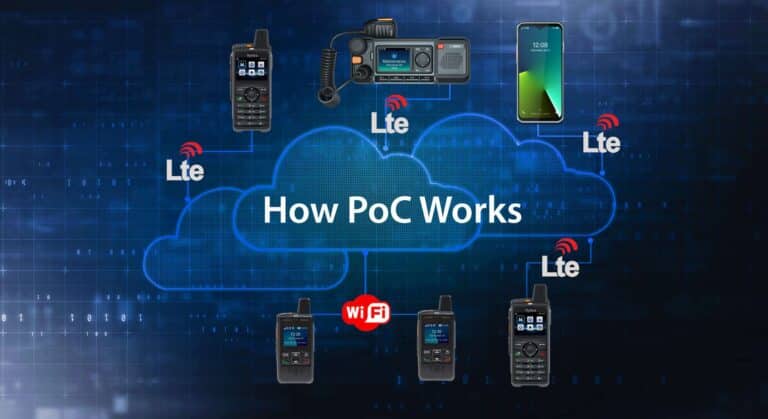
PoC dispatch works by connecting the dispatcher, PoC handheld radios, PoC mobile radios, and smart devices to the same cloud-based PoC platform.
When a dispatcher makes a call, the dispatch application sends the call request through the internet to the PoC server. The server identifies the selected user, talk group, fleet vehicle, or dynamic group and routes the audio to the correct PoC devices. The dispatch software uses the speaker and microphone on the computer to communicate with the radios. The call travels over IP networks, using 4G/LTE and 5G cellular networks or Wi-Fi to reach radios in the field.
From the radio user’s perspective, the workflow remains simple. The employee hears the dispatcher through the radio speaker, presses the PTT button to respond, and continues working with a familiar radio-style interface.
The same system also receives GPS location information from PoC radios that have built-in GPS. The radio periodically sends location data through the PoC network. The dispatch application displays those users or vehicles on a map so dispatchers can see where people and assets are located.
The result is a real-time communication and location platform: dispatchers can talk to users and see where they are at the same time.
GPS Built Into PoC Radios
GPS is a key difference between basic push-to-talk calling and full PoC dispatch. Many professional PoC radios, mobile radios, and smart devices include built-in GPS. The dispatch application uses GPS data to show the location of workers, vehicles, or radios on a map.
This creates practical benefits for operations:
- Dispatchers can identify the nearest available worker.
- Supervisors can see where vehicles are located.
- Managers can review routes and travel history.
- Emergency alerts can be tied to a user’s location.
- Route compliance can be verified.
- Service response can be coordinated faster.
- Field activity can be documented with timestamps and location records.
For fleets, GPS tracking helps convert radio communication into a broader fleet management tool. The dispatcher is no longer only listening to radio traffic. They can see where vehicles are, how routes are progressing, and which driver or worker is closest to the next task.
Why Web-Browser Based Dispatch Matters
One of the most important differences between dispatch applications is how the software is accessed.
A web-browser based dispatch application can be opened from an authorized computer with internet access. This can be more flexible than traditional client software that must be installed on a specific workstation or server-based dispatch software that requires local infrastructure.
A web-browser based dispatch application can provide several advantages:
- Easier access from authorized locations
- Reduced IT installation requirements
- Fewer workstation dependencies
- Easier updates
- More flexible supervisor or manager access
- Better scalability across multiple locations
- Less reliance on a dedicated dispatch computer
- Easier expansion to additional dispatchers
- Lower complexity for distributed organizations
Installed client software can still be appropriate in some environments, but it may create limitations. If dispatch only works on one computer, access becomes less flexible. If software must be installed, updated, and maintained on every dispatcher workstation, IT overhead increases. If server hardware is required, the deployment becomes more complex and expensive.
For many PoC deployments, browser-based dispatch fits the cloud-based nature of PoC. Radios connect through broadband networks to the PoC server, and dispatchers access the platform through an authorized browser interface.
PoC Dispatch Features and What They Do
A PoC dispatch application is valuable because it combines communication, location, and operational control. The features should be evaluated based on the problems they solve.
Individual and Group Calling
Dispatchers can call one user, a predefined group, or a dynamic group. This allows fast communication with a driver, technician, security officer, maintenance team, or entire department.
For example, a dispatcher may call one driver about a route change, then call the entire fleet about a weather delay.
Dynamic Call Groups
Dynamic call groups allow a dispatcher to create a temporary group based on a list selection or map selection. This is useful when the dispatcher needs to coordinate users who are not normally in the same talk group.
For example, a dispatcher may select several nearby drivers or field workers and create a temporary response group for one incident.
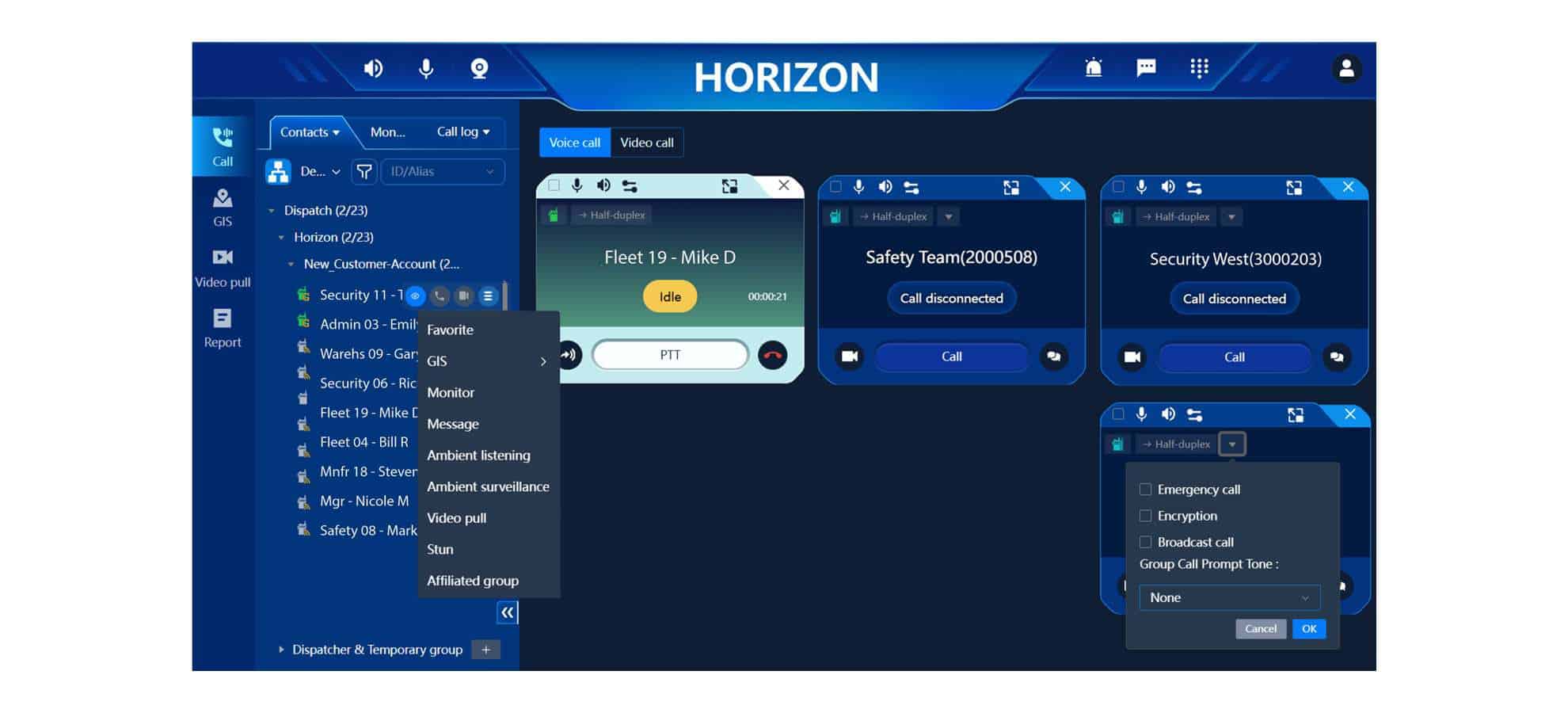
PoC Dispatch screen showing multiple call tiles, group call lists, and call settings
GPS Location Tracking
GPS tracking allows the dispatcher to see where radios and vehicles are located in real time. This improves coordination, response time, and accountability.
For fleets, GPS helps dispatchers understand which vehicle is closest, whether a driver is on route, and where delays may be occurring.
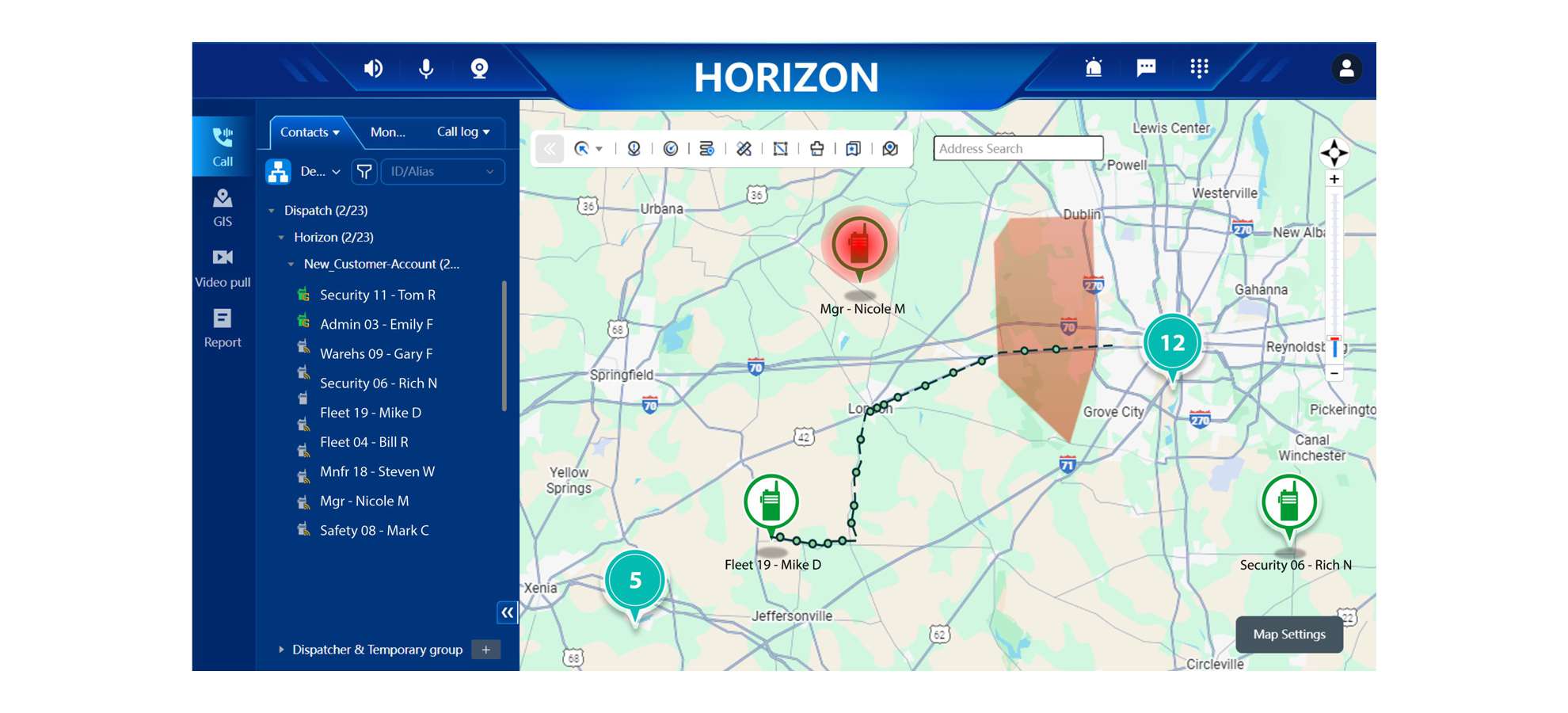
PoC dispatch screen with map, geofence area, and travel route with breadcrumbs. Also shows a user that has pressed the emergency button on their radio.
Alt Text PoC dispatch screenshot of map with geofence and travel route breadcrumbs.
Route History and Breadcrumbs
Route history shows where a vehicle or radio has traveled. Breadcrumb trails and timestamps can help managers review routes, confirm arrivals, investigate delays, and document field activity.
This is useful for transportation, delivery, waste management, shuttle operations, service fleets, security patrols, and mobile maintenance teams.
Geofencing
Geofencing allows the dispatcher or administrator to define a virtual boundary on a map. The system can generate alerts when a user or vehicle enters or leaves that area.
Geofencing is useful for:
- Route compliance
- School bus operations
- Security patrol zones
- Construction sites
- Logistics yards
- Restricted areas
- Service territories
- Customer sites
- Facility perimeters
Emergency Alerts
Emergency alerts help workers request help quickly. When a user presses an emergency button or triggers an emergency condition, the dispatch application can display an alarm and show the user’s location.
This is valuable for lone workers, security officers, drivers, healthcare staff, school personnel, and field teams.
Text, Image, and Video Sharing
Voice communication is fast, but some situations benefit from visual information. Text, image, and video sharing can help dispatchers understand what is happening without waiting for a long verbal explanation.
A driver can send an image of a blocked entrance. A maintenance worker can send a photo of damaged equipment. A security officer can share visual information from an incident scene. A dispatcher can send a text instruction to one user or a group.
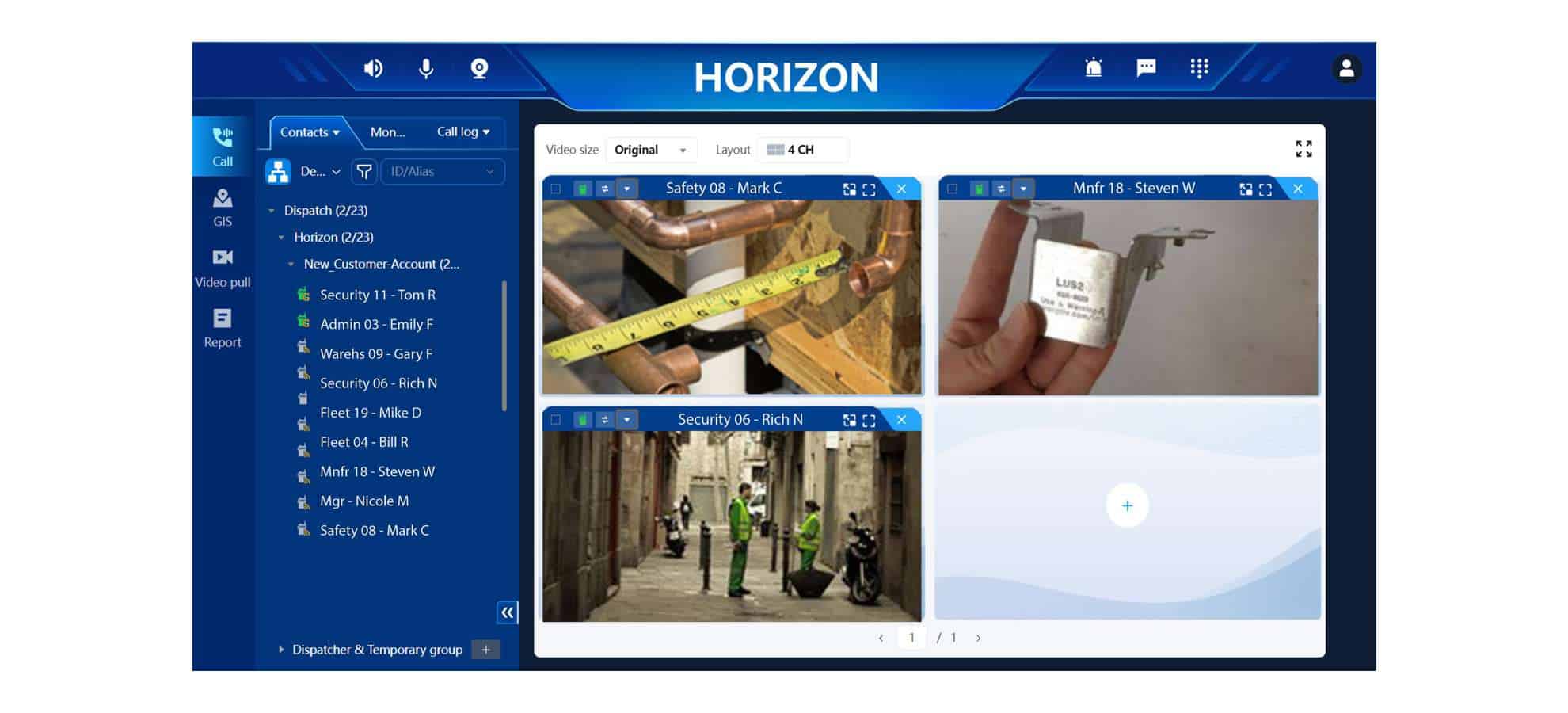
PoC Dispatch with windows for sharing videos and images
Logs, Reports, and Records
Dispatch logs help organizations review what happened after the fact. Depending on the platform, dispatch may store call records, messages, emergency alarms, geofence alarms, overspeed alarms, and other activity.
Reports can help managers analyze communication patterns, review incidents, document response activity, and improve operations.
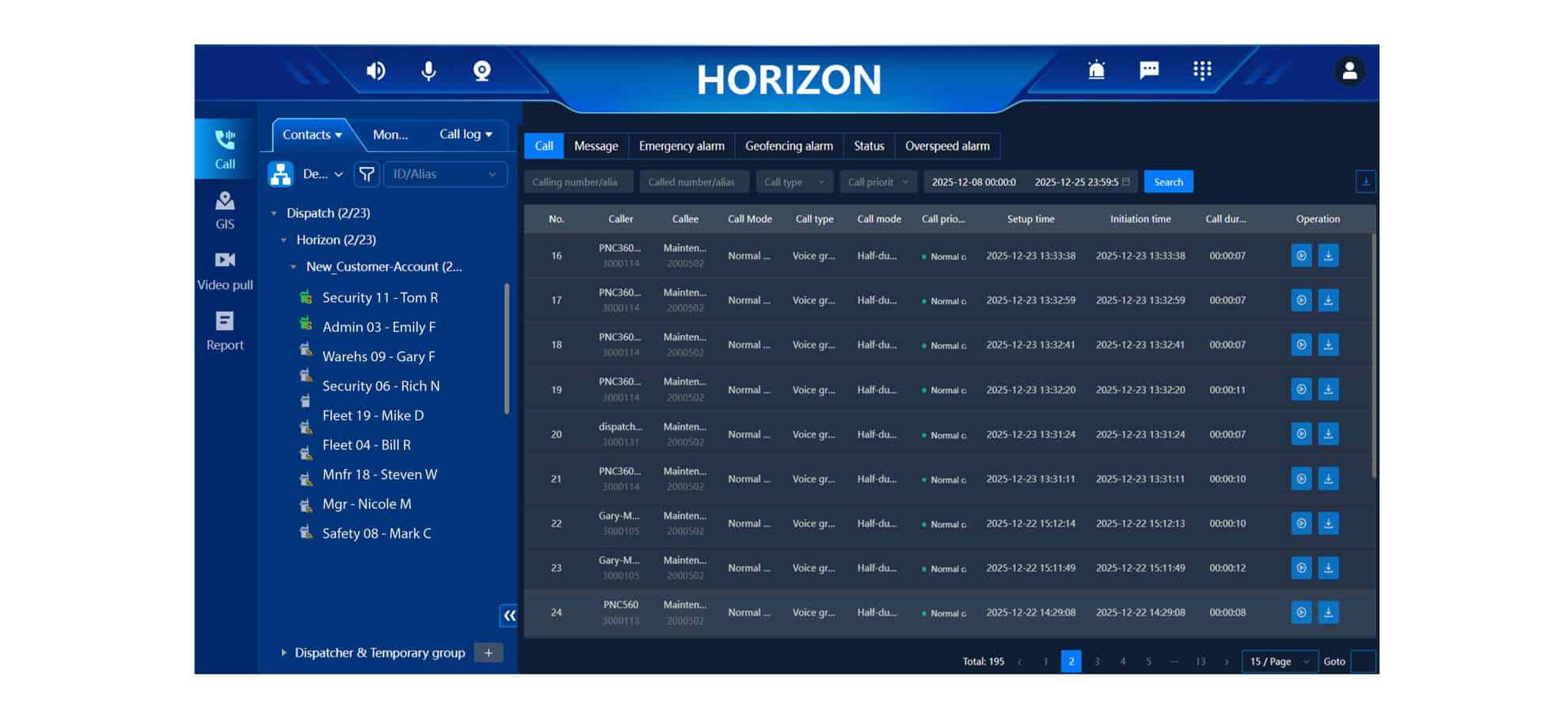
PoC Dispatch screen showing a call log report
Benefits of PoC Dispatch for Fleet Operators
Fleet operators need more than voice communication. They need to know where vehicles are, which driver is available, how routes are progressing, and how to respond when plans change.
PoC dispatch helps fleet operators by combining push-to-talk calling with GPS-based fleet visibility.
Faster Driver Communication
Dispatchers can reach one driver or an entire group instantly. This is useful for route changes, schedule updates, customer issues, weather disruptions, vehicle problems, traffic conditions, or safety alerts.
Better Route Visibility
GPS tracking and route history help managers see where vehicles are and where they have been. This improves accountability and helps resolve questions about missed stops, delayed arrivals, service verification, and route performance.
Improved Response Times
When a new job, incident, or customer request comes in, the dispatcher can identify the closest vehicle or field worker. This reduces guesswork and can improve response time.
Safer Driver Workflows
A PoC mobile radio gives drivers a purpose-built communication device with a physical PTT button, loud audio, and tactile controls. This can be more practical than trying to use a smartphone while managing a route or vehicle. PoC mobile radios provide additional safety features such as sending speeding and driver fatigue (driving continuously for a long period) alarms to the dispatcher.
Better Emergency Coordination
If a driver has an emergency, dispatch can receive the alert and see the location. This helps supervisors send help faster and coordinate with the correct team.
Stronger Route Compliance
Geofencing and route history can help confirm whether vehicles entered, exited, or remained within expected service areas. This is useful for school transportation, shuttle services, security patrols, construction fleets, logistics yards, waste hauling, and service routes.
More Complete Documentation
Call logs, message logs, route history, timestamps, and alarm records help managers review what happened. This can support incident review, customer service, compliance workflows, and operational improvement.
Who Uses PoC Dispatch and Fleet Management?
PoC dispatch is useful for organizations with mobile workers, vehicles, field teams, or multiple locations.
Common users include:
- Transportation fleets
- School bus operations
- Field service teams
- Shuttle services
- Security companies
- Mobile patrols
- Delivery fleets
- Waste management companies
- Construction companies
- Facility management teams
- Hotels and resorts
- Hospitals and healthcare campuses
- Warehouses and logistics operations
Any organization that needs to communicate with mobile users and know where they are can benefit from PoC dispatch.
What to Look for in a PoC Dispatch System
When evaluating PoC dispatch, buyers should look for a system that is flexible, scalable, and easy to use.
Key questions include:
- Is the dispatch application web-browser based?
- Does it require installed client software?
- Does it require local server hardware?
- Does it support individual and group calling?
- Does it support GPS location tracking?
- Does it show route history and breadcrumbs?
- Does it support geofencing?
- Does it support emergency alerts?
- Does it support text, image, and video sharing?
- Does it provide call logs and message logs?
- Does it support reports?
- Can dispatchers create dynamic groups?
- Can the system scale to multiple dispatchers?
- Can dispatch access be segmented by location or role?
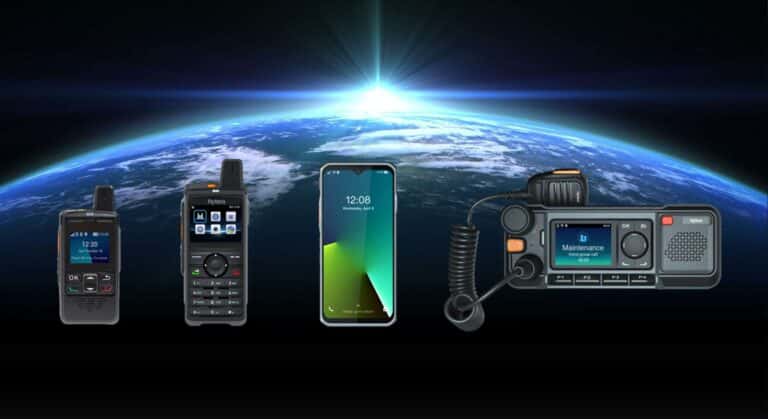
- Does it work with handheld PoC radios, mobile PoC radios, and smart devices?
The best PoC dispatch system should support daily operations without creating unnecessary IT complexity.
Conclusion
PoC dispatch and fleet management extend Push-to-Talk over Cellular beyond simple voice calling. A professional dispatch application allows supervisors and dispatchers to make IP-based calls to PoC radios, track users and vehicles with GPS built into the devices, coordinate incidents, send messages, review routes, create geofences, receive emergency alerts, and manage fleet activity from a centralized interface.
For fleet operators, the value is practical: faster communication, better route visibility, improved response times, safer driver workflows, stronger accountability, and better documentation.
A web-browser based dispatch application adds another advantage by reducing the limitations of installed client software and local server systems. It gives organizations a more flexible way to manage communication and fleet tracking across vehicles, facilities, remote workers, and multiple locations.
For any business that depends on mobile teams, PoC dispatch turns push-to-talk communication into a scalable operations and fleet management tool.
Frequently Asked Questions
PoC dispatch is a centralized application that lets dispatchers communicate with Push-to-Talk over Cellular radios, monitor GPS locations, coordinate field users, manage fleets, create call groups, respond to emergency alerts, and review activity logs.
PoC dispatch works by connecting the dispatcher application, PoC radios, mobile radios, and smart devices to the same cloud-based PoC platform. Dispatch calls are routed over IP networks to PoC devices using 4G/LTE and 5G cellular networks or Wi-Fi.
PoC dispatch tracks location using GPS built into PoC radios, mobile radios, or smart devices. The devices send location information to the PoC platform, and the dispatch application displays users or vehicles on a map.
A professional PoC dispatch application can support individual calling, group calling, dynamic groups, GPS tracking, route history, geofencing, emergency alerts, text messaging, image sharing, video sharing, logs, reports, and fleet management workflows.
Web-browser based dispatch is useful because it can reduce IT complexity, avoid installed client software, support flexible access from authorized computers, simplify updates, and scale more easily across dispatchers, departments, and locations.
PoC dispatch helps fleet operators communicate instantly with drivers, track vehicle locations, review route history, identify the nearest available vehicle, respond to emergencies, monitor geofences, document activity, and improve route coordination.
Geofencing allows a dispatcher or administrator to draw a virtual boundary on a map. The system can generate alerts when a radio, worker, or vehicle enters or leaves that area.
GPS breadcrumbs are location points recorded over time that show where a user or vehicle has traveled. Breadcrumbs can help managers review routes, confirm service activity, investigate delays, and document field movement.
Yes. PoC dispatch can support emergency alerts from radios or smart devices. When an emergency is triggered, the dispatcher can receive the alert and use GPS information to identify the user’s location.
No. PoC dispatch is valuable for fleets, but it is also useful for security, schools, healthcare, hospitality, warehouses, construction, field service, facility management, utilities, and any organization with mobile workers or multiple locations.