
What is Push-to-Talk over Wi-Fi?

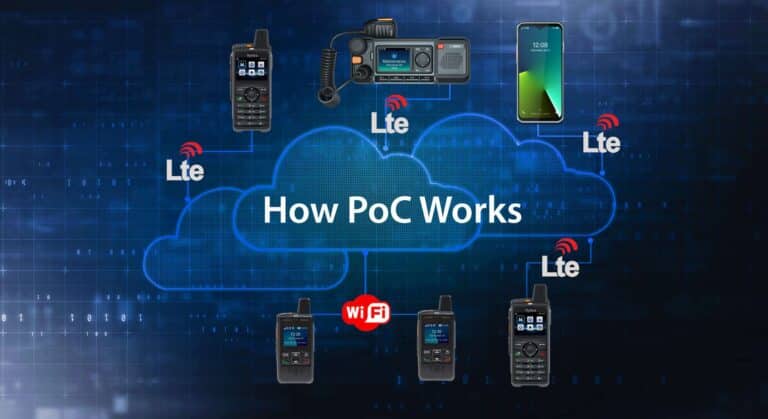
Push-to-Talk over Wi-Fi is a way for Push-to-Talk over Cellular radios to connect to a PoC cloud service through a facility’s Wi-Fi network instead of using a 4G/LTE or 5G mobile operator’s cellular network. It is not usually a separate type of communication system. It is one of the connectivity options used by PoC radios to reach the PoC server and make instant individual calls, group calls, emergency calls, and dispatch communications. When a PoC radio is connected to Wi-Fi, the device sends voice and data over the facility network, through the internet, and to the cloud-based PoC server. The server then routes the call to the correct users, talk groups, dispatchers, or connected systems.
Push-to-Talk over Wi-Fi is Part of PoC Connectivity
Push-to-Talk over Cellular, commonly called PoC, uses IP networks for radio-style communication. Most people think of PoC as cellular push-to-talk, but many PoC devices can also connect through Wi-Fi.
That means Wi-Fi should be understood as an access method within the broader PoC system.
A PoC radio may connect to the cloud service in more than one way:
- LTE, 5G, or 4G cellular data
- A Private Facility Wi-Fi
- Public Wi-Fi when approved and configured
The PoC platform remains the same. The PoC server still manages users, talk groups, permissions, dispatch access, GPS data, and call routing. The difference is the path the radio uses to reach the internet.
If the radio is outdoors or in a vehicle, it may connect through a cellular network. If the user is inside a hotel, warehouse, school, hospital, factory, or office facility with reliable Wi-Fi, the radio may connect through the Wi-Fi network instead.
How Does Push-to-Talk over Wi-Fi Work?
Push-to-Talk over Wi-Fi works by using the facility’s wireless network as the internet connection for a PoC radio.
The basic communication path looks like this:
- A user presses the push-to-talk button on a PoC radio.
- The radio captures the user’s voice and converts it into digital data.
- The device sends that data through the Wi-Fi access point.
- The facility network routes the traffic to the internet.
- The cloud-based PoC server receives the call request and voice packets.
- The server identifies the selected talk group, contact, dispatcher, or endpoint.
- The server routes the audio to the appropriate PoC radios, apps, or dispatch consoles.
- Receiving users hear the audio through their devices.
From the user’s perspective, the process is simple: press, talk, release, and listen.
Behind the scenes, the PoC radio is behaving like a connected IP device. It uses the Wi-Fi network to reach the PoC platform, just as a laptop, tablet, smartphone, camera, scanner, or other connected business device uses Wi-Fi to reach cloud applications.
When Should PoC Radios Use Wi-Fi?
Wi-Fi can be a strong connectivity option when users operate inside a building, facility, campus, or property where the wireless network is reliable.
Common environments include:
- Hotels and resorts
- Hospitals and healthcare campuses
- Schools and universities
- Warehouses and distribution centers
- Manufacturing plants
- Office buildings
- Convention centers
- Entertainment venues
- Large retail facilities
- Logistics yards
- Facility management operations
- Security operations
Wi-Fi can be especially useful in areas where cellular signal is weak indoors but the facility has strong Wi-Fi coverage. Many buildings have construction materials, walls, elevators, basements, mechanical rooms, stairwells, or interior corridors that can reduce cellular signal quality. A well-designed Wi-Fi network can help PoC radios stay connected in those areas.
How Wi-Fi and LTE Work Together in PoC
Many PoC radios support both Wi-Fi and cellular connectivity. This gives users more flexibility.
For example, a hotel maintenance employee may use Wi-Fi while inside the property. A security supervisor may use Wi-Fi inside the building and LTE when walking a parking lot. A shuttle driver may use LTE while driving, then connect to Wi-Fi when parked near the facility. A school district may use Wi-Fi on campus and LTE for buses, athletics, field trips, maintenance vehicles, or staff moving offsite.
In a well-planned deployment, Wi-Fi supports indoor and campus coverage, while 4G/LTE, and 5G supports wide-area coverage beyond the facility. The goal is not to choose Wi-Fi or cellular as completely separate systems. The goal is to give PoC devices the best available path back to the PoC cloud server.
PoC devices can switch seamlessly between Wi-Fi and cellular LTE networks.
Why Wi-Fi Quality Matters for PoC Radios
A solid and reliable Wi-Fi network is critical for a good PoC user experience.
PoC radios may use less bandwidth than many video-heavy applications, but they are highly sensitive to coverage gaps, roaming problems, latency, packet loss, and network instability. A short data interruption may not matter much when loading a web page, but it can interrupt a live push-to-talk call.
A Wi-Fi network that works acceptably for office laptops may not be suitable for PoC radios.
That is because many office Wi-Fi networks are designed for relatively stationary users. A few strategically placed access points may support employees sitting at desks, conference rooms, or front-office workstations. But PoC users are often mobile. They move through hallways, stairwells, storage areas, back-of-house spaces, parking areas, mechanical rooms, loading docks, and outdoor transition zones.
A PoC radio needs reliable coverage where employees actually work, walk, respond, patrol, clean, repair, deliver, inspect, and assist customers.
Stationary Wi-Fi Users vs. Moving PoC Radio Users
The difference between stationary and moving users is one of the most important planning points.
At a hotel, the front desk radios may remain in roughly the same place for long periods. If the front desk has strong Wi-Fi, those users may have a reliable experience.
But most other hotel PoC radios are moving all day. Housekeeping staff move from room to room and floor to floor. Maintenance staff move through guest rooms, utility spaces, equipment rooms, pool areas, parking areas, and back-of-house corridors. Security staff patrol the property. Managers may move between the lobby, meeting rooms, service areas, and outdoor spaces.
Those users need continuous coverage.
For moving PoC users, the network must support reliable roaming from one access point to the next. If a user turns a corner in a hallway and the signal from one access point disappears before the next access point is strong enough, the device may experience a call interruption, delayed audio, reconnect event, or missed transmission.
Access Point Placement and Roaming
Access point placement is one of the most important parts of Wi-Fi readiness for PoC.
Access points should be positioned so that coverage overlaps appropriately. A PoC radio should be able to move through the facility without passing through dead zones or abrupt signal drop-offs. Hallway corners, stairwells, elevators, thick walls, metal structures, back rooms, service corridors, kitchens, storage areas, and loading docks can all create coverage challenges.
The goal is not simply to show that Wi-Fi exists in the building. The goal is to confirm that the radio can move through the required work areas while maintaining a stable connection to the PoC service.
Roaming performance matters because a moving device may need to transition from one access point to another during an active workday. Poor roaming behavior can cause short interruptions that affect real-time communication.
For PoC radios, the Wi-Fi design should be evaluated around user movement patterns, not just access point location on a floor plan.
Access Point Capacity and Device Load
Coverage is only one part of Wi-Fi suitability. Capacity also matters.
Every Wi-Fi access point has limits. Those limits vary by access point model, configuration, radio band, channel width, interference environment, connected device count, and traffic load.
An access point may technically cover an area but still perform poorly if too many devices are connected or if the available throughput is being consumed by other traffic. In a modern facility, the Wi-Fi network may already support laptops, smartphones, tablets, cameras, scanners, guest devices, printers, access control systems, building systems, IoT devices, and video applications.
Adding PoC radios increases the number of connected devices and introduces real-time communication traffic.
A Wi-Fi evaluation should consider:
- Number of PoC radios expected on the network
- Total number of Wi-Fi devices already connected
- Access point client capacity
- Available throughput per access point
- Network congestion during peak usage
- Roaming behavior between access points
- Guest Wi-Fi separation
- VLAN or SSID configuration
- Firewall rules and internet access to the PoC server
- Quality of service settings, if supported
- Coverage in back-of-house and operational areas
A facility may have good signal strength but still deliver a poor PoC experience if the network is overloaded.
Internet Bandwidth to the PoC Server
PoC over Wi-Fi also depends on the facility’s internet connection.
The radio connects to the Wi-Fi access point, but the call still has to reach the cloud-based PoC server. That means the local Wi-Fi network, switches, router, firewall, and internet connection all affect performance.
The network must provide a reliable data path to the PoC platform. If the internet connection is unstable, congested, heavily filtered, or misconfigured, PoC call quality can suffer even when Wi-Fi signal strength looks good.
A proper Wi-Fi qualification test should therefore include more than RF signal checks. It should also verify that the facility has enough network reliability and internet throughput to support PoC traffic to and from the cloud server.
How to Test a Facility’s Wi-Fi Network for PoC Radios
The best way to confirm whether a facility’s Wi-Fi network is ready for PoC radios is to perform a Wi-Fi coverage verification test before deployment.
This test should be performed across the actual areas where users will carry the devices. It should not be limited to offices, conference rooms, or public areas where coverage is already known to be strong.
A radio dealer or qualified network professional can use a Wi-Fi survey tool, such as NetSpot, to map the facility and identify coverage, signal strength, interference, and dead zones. Wi-Fi survey tools can produce a heatmap that provides a visual representation of signal strength and coverage across a facility. This helps the dealer, IT team, or facility manager see where coverage is strong, weak, noisy, or missing.
A practical PoC Wi-Fi verification should include:
- Walk-testing the entire facility
- Testing hallways, stairwells, corners, elevators, back rooms, and service areas
- Measuring signal strength across the floor plan
- Checking signal-to-noise ratio
- Identifying dead zones and weak coverage areas
- Checking for channel congestion or interference
- Confirming access point overlap for roaming
- Testing device behavior while walking through the facility
- Verifying throughput to the internet
- Confirming stable access to the PoC cloud server
- Testing at busy times when the network is under normal load
- Testing with the same or similar PoC devices that will be deployed
The goal is to confirm that the network supports real-world PoC usage, not just theoretical Wi-Fi coverage.
What Happens if Wi-Fi Coverage is Not Good Enough?
If Wi-Fi coverage is weak, a PoC radio may experience:
- Delayed audio
- Missed calls
- Dropped call sessions
- Reconnection delays
- Poor roaming between access points
- Unavailable service in dead zones
- Inconsistent emergency call performance
- User frustration and reduced confidence in the system
These problems are usually not caused by the PoC radio itself. They are often caused by gaps in the Wi-Fi network, insufficient access point coverage, poor roaming design, network congestion, or an unreliable internet path.
That is why Wi-Fi should be qualified before a business relies on it for critical push-to-talk communication.
Often times, the solution to making the Wi-Fi network suitable for PoC radios is adding a some access points to areas without coverage.
Can PoC Radios Switch Between Wi-Fi and LTE?
Many PoC devices can support both Wi-Fi and cellular networks. PoC devices use Wi-Fi when it is available and can seamlessly switch to a 4G/LTE or 5G cellular network when Wi-Fi is unavailable.
This can be useful for organizations with both indoor and mobile users. Wi-Fi can support indoor facility communication, while cellular data can support users who leave the facility, work outdoors, drive vehicles, or move between job sites.
However, businesses should not assume all devices, networks, or configurations will behave the same way. The best approach is to test how the specific PoC radios will perform in the actual environment where they will be used.
Is Push-to-Talk over Wi-Fi Reliable?
Push-to-Talk over Wi-Fi can be reliable when the Wi-Fi network is designed, tested, and maintained for mobile users.
The key qualifier is network quality.
A reliable PoC over Wi-Fi deployment requires:
- Strong RF coverage in all required operating areas
- Proper access point placement
- Good roaming between access points
- Sufficient access point capacity
- Low interference
- Enough internet bandwidth
- Stable connectivity to the PoC server
- Proper firewall and network configuration
- Testing with actual user movement patterns
When these conditions are met, Wi-Fi can be an effective connectivity path for PoC radios inside facilities and campuses.
Conclusion
Push-to-Talk over Wi-Fi is best understood as a PoC connectivity option. It allows PoC radios to reach the cloud-based PoC server through a facility Wi-Fi network instead of relying only on 4G/LTE or 5G cellular networks.
This gives organizations more flexibility. Workers can use Wi-Fi indoors where facility coverage is strong and cellular data when they move outside the Wi-Fi coverage area.
The most important planning factor is Wi-Fi quality. A network designed only for stationary laptops or front-office devices may not be suitable for mobile PoC users moving throughout a hotel, hospital, school, warehouse, factory, or large facility.
Before deploying PoC radios over Wi-Fi, businesses should have their radio dealer or network professional perform a Wi-Fi coverage verification test. The test should evaluate RF coverage, roaming, access point placement, capacity, reliability, throughput, and the internet connection to the PoC cloud server.
With a properly qualified Wi-Fi network, PoC radios can deliver reliable push-to-talk communication inside the facility while remaining part of a broader PoC solution that also supports cellular wide-area coverage.
Frequently Asked Questions
Push-to-Talk over Wi-Fi is a way for PoC radios to connect to a cloud-based Push-to-Talk over Cellular service through a facility Wi-Fi network. It allows users to make push-to-talk calls over Wi-Fi instead of using cellular data.
Usually, no. Push-to-Talk over Wi-Fi is best understood as a connectivity option within a PoC system. The PoC server, users, talk groups, dispatch applications, and service platform remain the same. Wi-Fi is simply one way the device reaches the PoC cloud service.
A PoC radio connects to the facility Wi-Fi network, sends voice and data through the internet to the PoC server, and the server routes the call to the selected user, talk group, dispatcher, or connected endpoint.
PoC radios do not need LTE when they are operating only inside a reliable Wi-Fi coverage area. However, LTE, 5G, or 4G cellular data is important when users leave the Wi-Fi area, work outdoors, drive vehicles, or need wide-area coverage.
Many PoC devices support both Wi-Fi and cellular connectivity. Depending on the device and configuration, they may use Wi-Fi when available and cellular data when Wi-Fi is unavailable.
A suitable Wi-Fi network should provide strong coverage in all work areas, reliable roaming between access points, enough access point capacity, low interference, stable internet access, and reliable connectivity to the PoC cloud server.
Office Wi-Fi is often designed for stationary users such as laptops at desks. PoC users are usually mobile and may move through hallways, stairwells, back rooms, service areas, parking areas, and other spaces that were not prioritized in the original Wi-Fi design.
A business should have a radio dealer or qualified network professional perform a Wi-Fi coverage verification test using a survey tool such as NetSpot. The test should check coverage, dead zones, roaming, interference, throughput, access point load, and internet connectivity to the PoC server.
Weak Wi-Fi coverage can cause delayed audio, dropped call sessions, missed transmissions, reconnection delays, and unreliable push-to-talk performance.
Neither is automatically better. Wi-Fi can be effective inside a properly covered facility, while LTE or 5G is better for wide-area mobility beyond the facility. Many PoC deployments use both.